AndaSeat Examines Kaiser 4 Adjustment Systems for Multi-Input PC Use
AndaSeat Examines Kaiser 4 Adjustment Systems for Multi-Input PC Use SPOKANE, WA, UNITED STATES, July 30, 2026

Press Release Disclaimer: This is a press release distributed through the XPR Media network. It has not been independently verified by our newsroom.

AndaSeat Examines Kaiser 4 Adjustment Systems for Multi-Input PC Use
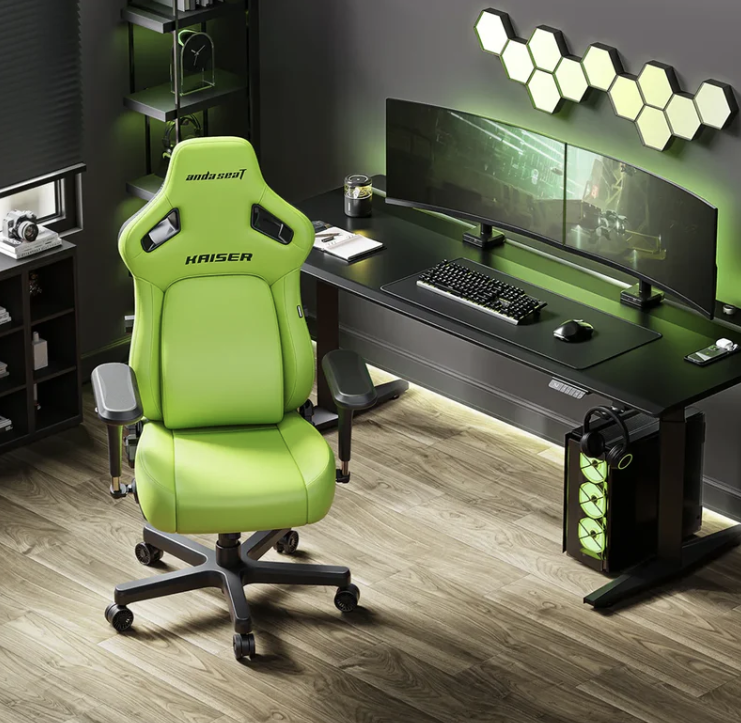
SPOKANE, WA, UNITED STATES, July 30, 2026 /EINPresswire.com/ — AndaSeat today published a design note on how seating adjustments can be reviewed when one computer workstation is used with several input methods. Using the Kaiser 4 as a product example, the note focuses on forearm position, lower-back contact, backrest angle and desk alignment.
A personal computer may be used for typing, mouse-based work, controller gaming, drawing, editing, video viewing and mobile-device interaction during the same day. These activities do not place the hands, arms and torso in the same position. The note therefore treats chair adjustment as a series of separate mechanical changes rather than one fixed setup for every task.
The document does not identify one sitting posture as suitable for all users. It does not present the Kaiser 4 as a medical device, posture-correction system or replacement for movement away from a workstation. Its scope is limited to product controls, stated adjustment ranges and how those controls can be repositioned when the activity changes.
Different Input Methods Change Arm Position
Keyboard use commonly places both hands in front of the body, while mouse use may move one arm farther to the side. A controller usually brings both hands closer together and nearer the torso. Drawing tablets and editing controls can create an uneven arrangement in which one arm remains close to the body while the other moves across a wider part of the desk.
Mobile devices can create another position, particularly when held above the lap. In each case, the distance between the elbows, direction of the forearms and position relative to the desk can change.
The Kaiser 4 includes 6D armrests with vertical, forward-and-back and rotational adjustment. The arm pads rotate through 180 degrees, while the arm structure rotates through 360 degrees. The system also includes 20 degrees of upward pad tilt, 7 cm of height adjustment, 4 cm of forward-and-back movement and up to 18 cm of lateral adjustment through rotation.
Height adjustment changes the relationship between the armrest and desk. Forward-and-back movement changes where the forearm meets the pad. Rotation changes the direction of the contact surface when the hands move closer together or farther apart.
The system does not select a position automatically. Desk height, user dimensions, input-device location and individual preference remain part of the setup.
“Computer workstations now move between more types of input than a keyboard and mouse alone,” said Lin Zhou, CEO of AndaSeat. “This design note explains how the Kaiser 4 controls are separated so that arm, back and head contact can be changed independently when the activity at the desk changes.”
Separate Controls Address Backrest and Seat Position
Changes in hand position can also change how the upper body meets the chair. Typing or detailed mouse work may bring the torso closer to the desk. Controller use may place the hands nearer the body and increase contact with the backrest. Reading or video viewing may involve a more open backrest angle.
The Kaiser 4 uses a gas-spring lumbar structure with separate controls for angle, height and depth. The outer section moves through a stated 24-degree range and can be secured at a selected angle. Inside that section, a four-way mechanism provides 76 mm of vertical adjustment and 30 mm of depth adjustment.
The angle control changes the prominence of the lumbar section. The height control changes where it meets the lower back, while the depth control changes how far it extends toward the user.
The mechanism does not assess posture or identify a clinically appropriate setting. It provides a defined range of mechanical positions. Individual settings may vary with torso length, sitting depth, backrest angle and contact preference.
The chair reclines to 135 degrees and includes a 15-degree rocking mode. A magnetic memory-foam head pillow can be moved vertically across an attachment range of approximately 20 cm, while seat height can be adjusted through 6.5 cm.
The design note treats each control as a separate part of the workstation. Rotating the armrests does not require a change in lumbar depth, and reclining the backrest does not automatically determine seat height.
This separation reflects the fact that workstation changes do not always affect every part of the body in the same way. A person may change the direction of the armrests while continuing to use the same backrest angle. Another activity may require a change in recline without changing the relationship between the seat and desk.
The controls remain manually operated. They do not monitor the user, issue posture instructions or make automatic changes during computer use.
Kaiser 4 Illustrates Seating for Mixed Computer Tasks
The final section shows how several controls can be combined without defining one universal chair setting.
For keyboard and mouse work, a user may select a more upright backrest angle and position the armrests in relation to the work surface. Controller use may involve inward armrest rotation and a different level of backrest contact. Video viewing may involve greater recline and a revised head-pillow position.
These examples describe possible mechanical configurations, not recommended postures. The same activity may involve different settings for different people and desks. A shared workstation may also require the chair to be readjusted when the user changes.
The Kaiser 4 is produced in more than one size configuration for stated user-height ranges of approximately 150 to 210 cm, depending on the model and regional specification. Body proportions and sitting preference can also affect the relationship among the seat, backrest, armrests and desk.
The series is produced with leather and linen upholstery. Materials and colors vary by market. These configurations do not change the purpose of the design note, which is to explain the independent adjustment systems rather than compare or rank the available finishes.
The document also separates movement within the chair from movement away from the workstation. Reclining, rocking or changing an armrest position alters the relationship between the user and chair, but these actions are not equivalent to standing, walking or leaving the seated position.
AndaSeat’s design note concludes that a chair is one part of a wider workstation. The desk, display, input devices, floor space and arrangement of nearby equipment also affect how the workstation is used.
A keyboard, mouse, controller or drawing tablet can alter the position of the hands and arms without changing the computer itself. Separating the chair’s controls makes it possible to change one contact area without requiring the entire setup to be repositioned.
The Kaiser 4 is presented in the document as an example of this mechanical approach. Its controls provide defined adjustment ranges for the arms, lower back, backrest, head-contact area and seat height. They do not establish one correct arrangement for every user or task.
The overall purpose of the design note is to document how the chair’s settings correspond with changes in computer input and seated activity. Product specifications are presented as measurements and mechanical functions rather than health outcomes or guarantees about individual experience.
About AndaSeat
Founded in 2007, AndaSeat develops seating, desks, monitor arms and related workspace products for professional, gaming, creator and home environments.
Caroline Chen
AndaSeat
+86 139 2232 2347
email us here
Visit us on social media:
LinkedIn
Instagram
Facebook
YouTube
TikTok
X
Legal Disclaimer:
EIN Presswire provides this news content “as is” without warranty of any kind. We do not accept any responsibility or liability
for the accuracy, content, images, videos, licenses, completeness, legality, or reliability of the information contained in this
article. If you have any complaints or copyright issues related to this article, kindly contact the author above.

Media gallery